

You can have the best video in the world, but if nobody clicks on it, it doesn't matter. On a crowded YouTube homepage, your thumbnail is the single most important factor in getting views. It's your one shot to grab a viewer's attention.
But what separates a low-performing thumbnail from a high-performing one? It’s not magic; it’s a combination of science and strategy.
This guide covers the essential best practices for creating a successful YouTube thumbnail, from the correct technical specifications to the psychological tricks that earn the click.
First, The Technicals: YouTube Thumbnail Size and Dimensions
Before you even think about design, you need to get the technical details right to avoid blurry or poorly cropped images.
- Recommended Resolution: 1280 x 720 pixels. This is the standard HD resolution.
- Aspect Ratio: 16:9. This ensures your thumbnail looks perfect across all devices.
- File Size: Keep it under 2MB.
- File Formats: JPG, PNG, GIF are all accepted.
The Psychology of a High-CTR Thumbnail
Once the technicals are set, it's time for the creative part. A great thumbnail speaks directly to the viewer's brain.
Pro Tip: Design for the Small Screen First
This is the single most important rule. While you must upload a 1280x720 image, remember that 99% of viewers will first see your thumbnail when it's very small—in search results, on the homepage, or in the 'Up Next' sidebar (typically 250-450 pixels wide). A design that looks great on your large monitor can become a blurry, unreadable mess when shrunk down.
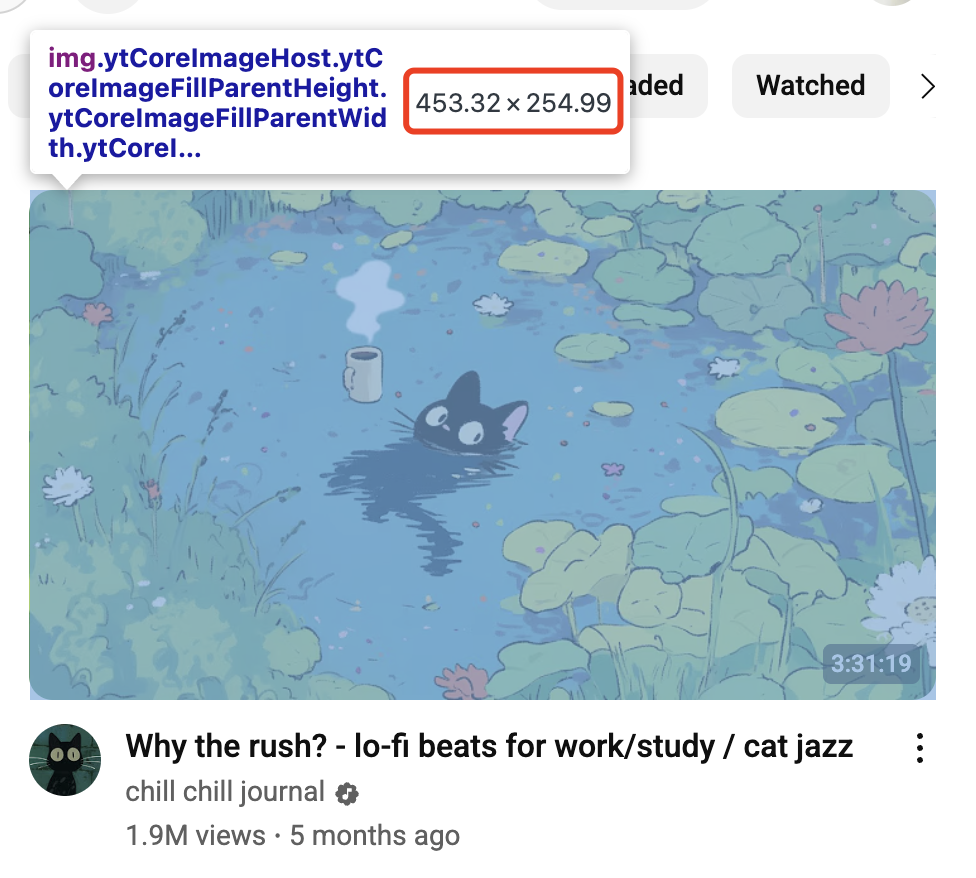
Before you finalize your design, zoom out until the image is about the size of your thumb. Can you still clearly read the text? Can you still understand the emotion on the face? If the answer is no, your design is too cluttered.
1. The Power of Emotion: Use a Human Face
Our brains are hardwired to be drawn to other human faces. Top YouTubers almost always feature a clear photo of a person showing a strong, easily readable emotion: shock, excitement, or curiosity. This creates an instant connection that makes viewers want to know more, even at a small size.
2. The Science of Clarity: Bold, Brief Text
Because you're designing for a small screen, any text must be instantly understandable. The best practice is to use 3-5 powerful, high-impact words with a thick, high-contrast font. This text should add intrigue or highlight the core value of the video, and most importantly, be legible when small.
3. The Art of Color: Contrast and Branding
On a visually noisy platform, high-contrast color combinations are your best tool for standing out. Before you design, search for your topic on YouTube. See what colors your competitors are using, and choose a palette that will pop and look different from everything else on the page.
The Best Way to Learn: Research and Download Thumbnails
The best way to get ideas is to study what's already successful. Before you design, you should analyze the thumbnails of top-performing videos in your niche.
But how do you get these images in high quality for analysis? A manual screenshot is often blurry. For this, you need a dedicated tool.
Our Free YouTube Thumbnail Downloader is the perfect solution. You can paste any video URL and instantly download the YouTube thumbnail in its original high quality, including HD and even upscaled 4K versions. Use it to build your own "swipe file" of great designs to inspire your creative process.
Frequently Asked Questions (FAQ)
How to download a YouTube thumbnail in 4K?
You can use a free tool like the VDown YouTube Thumbnail Downloader. [cite_start]Simply paste the video's URL, and it will provide you with a download link for the highest available quality, including 4K.
What is the best size for a YouTube thumbnail?
[cite_start]The officially recommended size is 1280x720 pixels with a 16:9 aspect ratio. This ensures your thumbnail looks sharp on all devices.
Is it legal to download YouTube thumbnails?
Yes, it's legal to download thumbnails for personal use, like for research or inspiration. However, the images themselves are copyrighted by the creator. [cite_start]If you want to reuse a thumbnail publicly, you must get the creator's permission first.