
Juggling a heavy course load is a classic part of student life. Between classes, assignments, and maybe even a part-time job, finding enough time to review lecture materials can be a real challenge. But what if you could turn your commute, your gym session, or your evening walk into a productive study period?
The solution is simpler than you think: converting your video lectures from YouTube into audio files (like MP3s). This study hack allows you to absorb key information without being tied to a screen, making your learning more flexible and efficient.
This guide will walk you through why this method is so effective and how you can start building your own audio lecture library today.
Why Convert YouTube Lectures to Audio?
Before we get to the "how," let's explore the "why." Listening to lectures offers some unique advantages that can transform your study habits.
Real-World Scenarios:
- Meet Sarah, The Commuter: Sarah has a 45-minute bus ride to campus each way. Instead of just listening to music, she now uses that time to review her dense Economics 101 lectures. By the time she gets to class, the key concepts are already fresh in her mind.
- Meet Alex, The Multi-tasker: Alex works part-time in a retail store. During quieter moments like stocking shelves, he listens to his history course lectures on a single earbud. This allows him to earn money and study simultaneously, freeing up his evenings for focused assignment work.
- Meet Maria, The Fitness Enthusiast: Maria finds it hard to sit still and re-watch long biology lectures. By converting them to audio, she can listen to them while on the treadmill or lifting weights, combining her physical and mental workouts.
Benefits of Listening Instead of Watching
The benefits are clear:
- Maximize Your Time: Turn "dead time" into productive study sessions.
- Reduce Screen Fatigue: Give your eyes a much-needed break from screens.
- Reinforce Learning: Repetition is key to memory. Listening to a lecture multiple times can solidify complex topics.
- Cater to Auditory Learners: If you learn best by listening, this method is tailor-made for you.
Best Way to Convert YouTube Lectures into MP3
Ready to get started? The process is incredibly straightforward.
Step 1 – Copy Your YouTube Video Link
Navigate to the YouTube video of the lecture or educational content you want to save. Click on the share button or copy the URL directly from your browser's address bar.
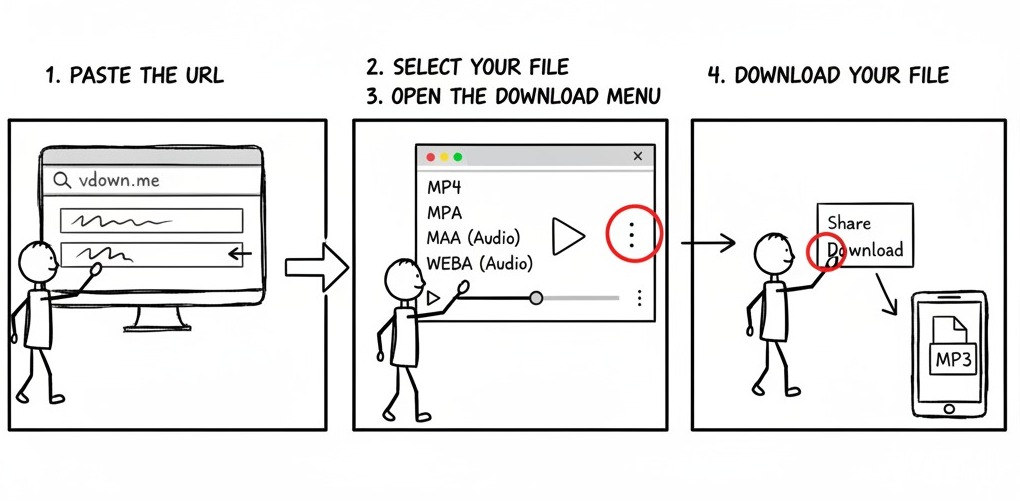
Step 2 – Paste It into the Tool
This is the most important step. You need a tool that is fast, free, and respects your privacy. For this, a simple and secure tool like vdown.me's YouTube to MP3 converter is a perfect choice.
Paste the URL: Open the vdown.me converter and paste the YouTube URL into the input box.
Step 3 – Download as MP3 and Listen Anywhere
Here's how to complete the process:
1. Select Your File: The tool will automatically display a list of available audio and video formats, along with their file sizes. Look for the audio-only options (typically M4A or WEBA format) and click on the one with the quality you prefer.
2. Open the Download Menu: A new browser tab will open, and the audio will begin to play. In the audio player bar, look for the "three dots" (⋮) icon, which is usually located on the right side.
3. Download Your File: Click the "three dots" icon to open a small menu, and then select the "Download" option. The MP3 file will now be saved directly to your device.
That's it! In just a few seconds, you have an audio file ready for your library.
Tips for Studying Smarter with Audio Notes
To get the most out of your new audio resources, a little organization goes a long way.
- Create Playlists by Course: On your phone or computer, create separate folders or playlists for each course (e.g., "CHEM-101," "PHIL-204"). This makes finding the right lecture quick and easy.
- Rename Your Files: Don't stick with the default file names. A clear naming convention like
[CourseCode] - Lecture 01 - [Topic].mp3will save you a lot of confusion. - Use a Podcast App: Apps like Spotify, Apple Podcasts, or Pocket Casts are excellent for managing and listening to local audio files. They offer features like variable playback speed, which is great for speeding through reviews or slowing down complex sections.
Free Online Tool to Convert YouTube Lectures
By converting YouTube lectures to audio, you unlock a more flexible and powerful way to study. You're no longer confined to your desk and can integrate learning seamlessly into your daily routine.
Start building your audio lecture library today and take control of your study schedule. Happy listening!